
Features & Product Tour
Patient Scheduling Experience
Key Features you'll see in this video tour
Existing Patient “Fast-Pass”: Recognizes returning patients via email verification, instantly pre-populating their data for a lightning-fast re-booking experience.
Smart Triage & Intake: New patients can select their visit type and relationship to the patient immediately, ensuring they are routed to the correct provider and workflow from the start.
Flexible Payment Entry: Patients can choose to provide insurance details upfront, select out-of-pocket payment, or skip the step to provide details later on a pre-visit form.
Preference-Based Discovery: Allows patients to filter appointment options by their highest priority—whether that is a specific Provider, a preferred Location, or the Earliest Available Time.
Real-Time Availability Engine: Prevents double-bookings by delivering live, reliable time slots updated to the second across a 365-day window.
Organized Time Selection: Neatly categorizes available appointments by time of day (Morning, Afternoon, Evening) to help patients find the perfect slot at a glance.
Group Appointment Eligibility: Simplifies the booking process for family sessions or group therapy by allowing additional patients to be added to a single slot during the initial flow.
Integrated Waitlist Entry: If a preferred time is unavailable, patients can opt-in to the waitlist immediately after confirming their secondary choice, powering the Automated Appointment Recovery engine.
Patient Pre-Visit Form
Key Features you'll see in this video tour
Mobile-First Digital Pre-Visit: Patients can complete their appointment registration from any device via a secure link sent in their confirmation and reminder emails.
Smart Pre-Population: Saves patient time by automatically filling in data already captured during scheduling, such as address, contact info, and basic insurance.
Insurance Card Image Capture: Allows patients to upload clear photos of the front and back of their insurance cards.
Guarantor Detail Tracking: Includes a dedicated, toggleable section for guarantor information if the patient is not the primary policyholder.
Consent Forms Submission: New patients review and e-sign your HIPAA Notice of Privacy Practices and Consent to Treatment forms prior to their first visit.
Streamlined Group Intake: Automatically provides a modified form for group appointments that intelligently excludes redundant insurance fields for additional participants.
Clinical Data Gathering: Collects essential pre-visit details including emergency contacts, preferred pharmacy, current medications, and known allergies.
Dashboard Integration: Submitted forms are instantly attached to the patient record and accessible via the
Scheduling Logic & Rules Engine
Key Features you'll see in this video tour
Automated Conflict Prevention: Eliminates double-bookings and time overlaps automatically, ensuring staff never have to manually cross-reference calendars.
Dynamic Rule-Based Availability: Only shows appointments that follow your practice’s specific rules for visit durations, required rooms, and provider-specific buffers.
Flexible Provider Templates: Set standard hours and breaks once and apply them across the entire week, or customize availability day-by-day for maximum flexibility.
Instant Availability Exceptions: Easily manage one-off days off, vacations, or administrative blocks per provider to keep the patient-facing scheduler 100% accurate.
Practice-Wide Guardrails: Set global restrictions for minimum advance booking (e.g., “no bookings within 2 hours of start time”) and enter holiday closures to block all availability instantly.
Reliable Self-Scheduling: Gives patients the freedom to book 24/7 while giving providers a schedule they can actually trust.
Automated Waitlist and
Canceled Appointment Recovery
Key Features you'll see in this video tour
Dual-Entry Waitlist Capture: Patients are automatically invited to join the waitlist if they can’t find a preferred time or immediately after confirming a future appointment to seek an earlier slot.
Hands-Free SMS Recovery: When a cancellation occurs, the system instantly identifies the best matches from your waitlist and sends automated SMS notifications to fill the opening.
Revenue Acceleration: By automatically pulling future appointments into today’s canceled slots, the system effectively shifts revenue forward and protects your daily yield.
Smart Match Logic: Prioritizes waitlisted patients based on appointment type and provider compatibility to ensure the recovered slot is a perfect fit.
Staff Backup Protocol: If the automated system doesn’t find an immediate match, it provides your staff with a “Possible Replacements” list to ensure no slot goes unfilled.
Actionable Performance Tracking: Use integrated analytics to monitor your net cancellation rate and see exactly how much revenue was reclaimed through the automated waitlist.
Managing Appointments
Key Features you'll see in this video tour
Clean, Organized Dashboard: A clutter-free, real-time view of the day’s appointments, with toggled sections to keep staff focused on the most relevant time periods.
Instant Multi-Location Switching: Seamlessly toggle between different providers or practice locations to manage complex schedules from a single interface.
Real-Time Status Tracking: Update appointment progress (e.g., Checked-In, In-Room, Completed) directly from the dashboard to keep the entire team synchronized.
Integrated Room Assignments: Assign or update appointment rooms on the fly, ensuring smooth patient flow and clear communication between front-desk and clinical staff.
Scannable Appointment Cards: Access organized “data cards” for every appointment, covering patient demographics, history of present illness, medications, and allergies.
One-Click EHR Bridge Activation: Launch the SureVisit EHR Browser Bridge directly from the appointment details page to sync data without manual entry.
Advanced Patient Lookup: Quickly find existing patients using names or identifiers like DOB and phone number to prepopulate details for follow-up scheduling.
CSV Data Export: Effortlessly export appointment records to spreadsheets for external reporting, though the integrated Actionable Analytics often removes this need.
EHR Browser Bridge
Key Features you'll see in this video tour
Instant Auto-Fill Technology: Automatically populates patient, appointment, and insurance details into your existing EHR fields with a single click.
No-API, No-IT Integration: Works as a lightweight browser extension that functions right inside your current EHR tab—no complex technical setups, expensive integrations, or API fees required.
Smart Field Matching: Intelligently identifies and matches fields between SureVisit and your EHR for seamless data transfer.
“Click-to-Paste Chips”: If a field can’t be matched automatically, a simple click-and-paste action instantly transfers details without any retyping.
Smart Bridge Mapping: The EHR Bridge learns and maps the fields where you need to click and paste, so the very next time you use the bridge those fields are included in the auto-fill. No PHI is mapped, just the fields.
Group Appointment Support: Effortlessly push data for multiple patients in a single group session into the bridge for rapid EHR entry.
Eliminate Data Entry Errors: Reduces the risk of typos and entry mistakes by pulling data directly from the source of truth in your scheduling platform.
Browser-Native Workflow: Automatically launches whenever you navigate to your EHR in a secondary tab, ensuring it’s always ready when you are.
Practice & Location Details
Key Features you'll see in this video tour
Branded Scheduling Landing Page: Easily update your practice name, “About” section, and professional photos to create a high-trust, branded entry point for patients.
Universal Booking Integration: Access a dedicated booking link that can be embedded anywhere—your website, social media, Google Maps, or online advertising.
Comprehensive Location Profiles: Manage one or multiple locations with ease, providing patients with specific addresses, map links for directions, and transit/parking instructions.
Insurance & Contact Transparency: List accepted insurance providers and main contact lines directly on the booking page to reduce administrative clarifying calls.
Smart Advance Notice Guardrails: Set a minimum lead time for new bookings (e.g., 24 hours notice) to ensure your staff is never surprised by an unscheduled arrival.
Holiday & Closure Overrides: Quickly set practice-wide closures or holiday exceptions to instantly remove those dates from patient-facing availability.
Upload Consent Forms: Upload your HIPAA Notice of Privacy Practices and Consent to Treatment forms for new patients to e-sign prior to their first visit.
Dynamic Room Management: Use the Location Manager to define and edit available exam or consultation rooms, ensuring the scheduler never exceeds your physical capacity.
Visit Type Details
Key Features you'll see in this video tour
Granular Service Customization: Easily define appointment names (e.g., Annual Wellness Exam, Initial Consultation), set specific durations, and provide detailed patient instructions for every service you offer.
Smart Room Assignments: Designate specific rooms for certain visit types (e.g., an X-ray room for imaging or a quiet suite for therapy). The scheduler automatically accounts for these physical restrictions to prevent overbooking.
Default & Custom Buffer Logic: Set universal appointment buffers (pre-visit or post-visit) across the practice to ensure clinicians have time for notes or resets. Providers can choose to use these defaults or set their own custom overrides.
Integrated Multi-Patient Support: Built specifically for group therapy, family sessions, or multi-patient medical appointments. Easily toggle a visit as “multi-patient” to allow several individuals to be added to a single slot during the booking process.
Automated Scheduling Guardrails: The “Smart Scheduler” cross-references room availability, provider buffers, and visit durations in real-time, ensuring that only viable time slots are ever shown to patients.
Dynamic Visit Visibility: Add, edit, or remove services instantly to keep your online scheduling options perfectly aligned with your current practice offerings.
Managing Provider Details
Key Features you'll see in this video tour
Provider Management & Availability
-
Direct Provider Booking Links: Give patients a direct path to a specific provider’s schedule, allowing for maximum control over the entry point of your scheduling flow.
-
Custom Patient Acceptance Status: Quickly toggle a provider’s status to control whether they are currently accepting new patients or existing patients only.
-
Smart Buffer Overrides: Set default visit buffers or create specific overrides per provider to ensure clinicians have the necessary “breathing room” between appointments.
-
Multi-Location Scheduling: Effortlessly manage complex schedules for providers who see patients across multiple practice locations.
Advanced Workflow Controls
-
Dynamic Room Assignments: Prevent scheduling bottlenecks by assigning providers to specific rooms or allowing them access to all available rooms by location.
-
Intelligent Availability Exceptions: Easily log one-time or recurring exceptions for vacations, days off, or administrative time without disrupting the master schedule.
-
Visual Provider Profiles: Maintain a professional patient-facing experience by easily updating provider bios, credentials, and profile pictures.
Patient Records
Key Features you'll see in this video tour
Instant Patient Retrieval: Locate any record in seconds using a smart search by name, with optional Date of Birth (DOB) filtering for precise matching.
Comprehensive Patient Profiles: Access a 360-degree view of the patient, including core demographic information, insurance details, and billing history in one organized interface.
Integrated Appointment History: View a complete timeline of past and upcoming appointments directly within the patient record to better track continuity of care.
Staff-Centric Design: Reduces administrative friction by consolidating everything the front desk needs—from contact info to insurance cards—into a single, clean view.
Centralized Source of Truth: Ensures that patient data is consistent across the platform, feeding directly into the
Actionable Analytics
Key Features you'll see in this video tour
Real-Time Practice Health Overview: Gain immediate visibility into appointment activity, new booking trends, and visit type popularity over any selected period.
Provider Utilization Tracking: Monitor current and future utilization rates to identify where you are meeting goals and where resources may need to be shifted.
Scheduling Conversion Funnel: Analyze where potential patients are dropping off in the booking process to optimize your conversion rates and digital marketing efforts.
Revenue Recovery Metrics: Track the effectiveness of no-show reductions and calculate the specific revenue reclaimed from canceled appointments.
Customizable ROI Calculator: View time and cost savings directly within the dashboard. You have complete control over the inputs (baseline costs, average appointment value) so the outcomes reflect your practice’s reality.
Calculated Utilization Lift: Set baseline targets per provider and monitor how specific scheduling decisions are impacting your bottom line in real-time.
Peak Booking Analysis: Identify your practice’s busiest booking hours and days of the week to better align staff availability with patient demand.
Practice Setup Wizard
Key Features you'll see in this video tour
Guided Step-by-Step Implementation: A streamlined, 6-step onboarding process that covers everything from practice branding and location mapping to provider scheduling and EHR integration.
Smart Appointment Import: Effortlessly migrate existing appointments from your old EHR or scheduling software using a simple CSV upload with automated field mapping and data preview.
Automated Patient Welcome Sequence: Send custom welcome emails to imported patients to introduce them to the new system and ensure they start receiving automated reminders immediately.
Rapid Live-Sync Logic: Once appointments are imported, the “Smart Scheduler” immediately accounts for them, instantly reflecting accurate availability on your public booking page.
Integrated EHR Extension Install: A dedicated setup step for the
Real-Time Progress Tracking: Visual indicators show exactly how far you are in the setup process and track the status of data uploads in real-time.
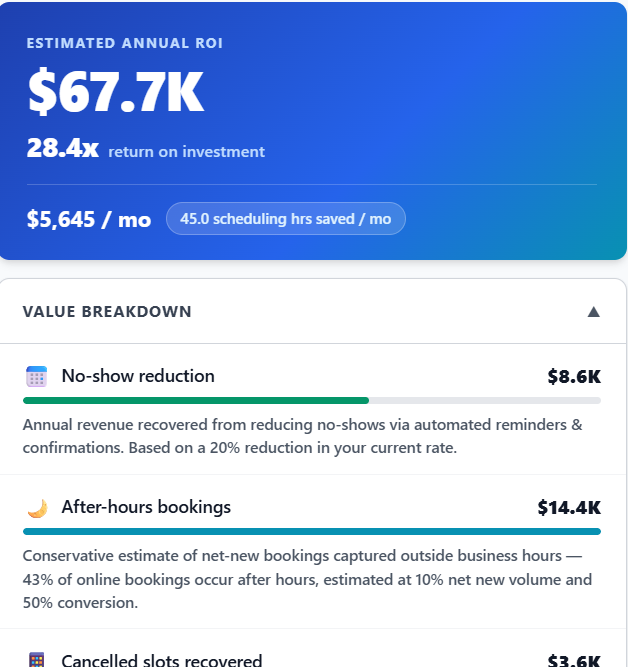
ROI Calculator
Have you checked out the SureVisit Health ROI Calculator?
Enter numbers for your practice to see the value that SureVisit Health can bring to your practice.
Download your results as a PDF report for your reference and/or to share with stakeholders.
Get Instant Access to Free Demo
Our demo accounts are pre-populated with sample practice, appointments, and patient data.
Mental Health Practice Demo

Mental Health Practice Demo
Enter your email and click ‘Get Instant Access’ for your demo.
Medical Practice Demo

Medical Practice Demo
Enter your email and click ‘Get Instant Access’ for your demo.